Microsoft Office 2019 Pro Plus Product Key
Microsoft Office 2019 Pro Plus Product Key
BY: Microsoft
Couldn't load pickup availability
- 30-day return policy
- Free Shipping
Shipping Information
Shipping Information
- Free shipping. Total estimated delivery time: 6–10 working days.
- Tracking information is provided by email once your order has been shipped.
Return
Return
- 30-day returns on unused items in their original condition and packaging.
- Return requests must be submitted by email before shipping items back.
- Approved refunds are issued to the original payment method within 10 business days.
Microsoft Office is not just another product for your operating system that you may or may not use in your office or any other usage at home or for a hobby. It is a must-have! Modern users cannot complete most of the tasks on their computers without the assistance of this helpful bundle of programs.

With this version – Microsoft Office 2019 Pro Plus – you get all the necessary tools and features. Deciding on this purchase, you can install all the software you need – Word, PowerPoint, Excel, Outlook, and many, many more! Your computer will thank you!
Microsoft Office Professional Plus is the best one. There are no better versions of this excellent product. It’s an easy install, fast delivery with many available languages to choose from!
Microsoft Office 2019 Pro Plus – a Humble Bundle

MS Office 2019 is a stable and great addition to all your professional business needs. If you need some help in organizing your office and getting things done quickly and efficiently – you definitely can use some Office in your, well, office.
Get personalized content and count on support directly from Bill Gates’s company themselves! Success has many names. Sometimes it's Word, sometimes it's Excel. Test the limits of these products, log onto your account and after providing a confirmation ID – check all the contents that satisfied customers for years!
With this new office version, you don’t only get the best features to organize or just do your work, but you also get some cool, personalized functions for your needs alone!
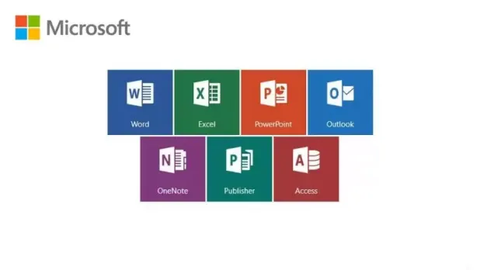
So, what does this humble bundle include?
Microsoft Word

Key Features
- Most popular writing editor on the market.
- Can save data in different formats.
- Has built-in browser.
Excel

This app is one of the many reasons why civilization is still moving forward. Even Excel creators are still finding new ways to use this product, and it is for a reason. Excel is one of the most important data collection and analyzing tools you can find on the market with little-to-none competition.
With a new, helpful user interface and advanced features like Analysis Toolpak, Slicers, and Formula Builder – you can really get to know your setup pretty well with this one.
Key Features
- Best way to collect and analyze data.
- Built-in tools that allow you to optimize your work.
- Endless possibilities when it comes to working on data, understanding it better and presenting it in a cohesive way.
Power Point

Power Point presentation is not only the tool used to show others your ideas in an organized fashion. This is a way of life. Creating Power Point presentations to show others what you think about them, a photos slideshow for a wedding or funeral, and just day-to-day informative presentations.
Key Features
- Easy to use presentation tool.
- Has many built-in graphics to use.
- Ergonomic design that allows every user to use it freely.
OneNote

If you need to keep track at work – OneNote is your digital notebook. Save ideas, photos, videos, and audio recordings in one place. It’s a great place to store your information that you can use with other Microsoft Office products.
Share and work with others using your notes in an easy and convenient way. Take them wherever you need them with easy access on your mobile phone app as well!
Key Features
- Accessible everywhere you go.
- Easy place to store music, video, and text.
- Great way to share files with ease.
Outlook

E-mails, calendars, and many, many more – all in one place! Outlook is a leading app when it comes to organizing your webspace. You can get all of the necessary work information in one place without logging on to many different accounts in the browser.
Microsoft Outlook is great when it comes to having an organized and connected workspace. With a great calendar app, you can stay connected with your coworkers and friends or family!
Key Features
- Best way to organize your e-mail from many different accounts.
- Ergonomic design; it’s easy to use in an efficient way.
- Has built-in calendar to help you organize your work.
System Requirements
- 1.6 GHz or faster, 2-core processor
- 2.0 GHz or faster recommended for Skype for Business
- 4 GB RAM for 64-bit; 2 GB RAM for 32-bit
- 4.0 GB free disk space
- 1280 x 768 or higher screen resolution
- Windows 10, Windows Server 2019
- Graphics hardware acceleration requires DirectX 9 or later, with WDDM 2.0 or higher for Windows 10
- If you are running Windows 10 Fall Creators Update or a later version, it requires WDDM 1.3 or higher
- Skype for Business requires DirectX9 or later, 128 MB graphics memory, and 32 bits per pixel capable format
- You might need to install .NET 3.5 or 4.6 or higher to use some features.
- Office 2019 cannot be installed alongside Office 2016
Download the MS Office using the Microsoft download links provided on the official Microsoft website.
How To Activate
Here is a quick guide on how to activate your Microsoft Office 2019 Professional Plus license key on your device! For other MS Office versions – seek Microsoft Customer Care Help. This activation code allows installing only this Office version. Previous versions will not be available anymore.
- If you can see this message from Activation Wizard, click "back" and activate it via phone.
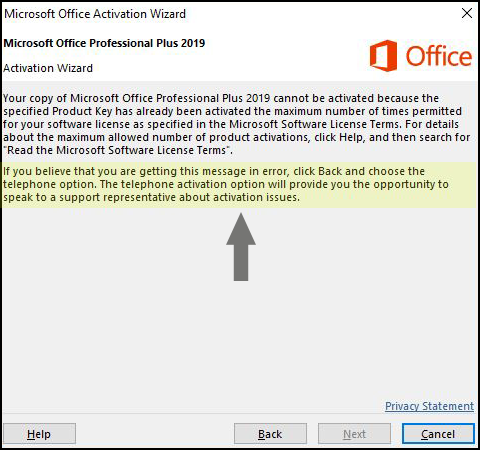
Microsoft Office – Key Phone Activation
- To activate Microsoft Office by phone, follow the instructions below and use “Use Self Service for Phone activation.”
To go through activation process with Microsoft, click the link below:
- Start the Office to open the Activation Wizard.

- Select: 'I want to activate the software by telephone'.

- Select your country/region from the dropdown and call the number provided. You will have to enter the Installation ID code provided by/in the installation.

- You will be given sets of numbers. Enter them into the text boxes. hit 'Next' and then 'Finish'.

- If you see a notice that telephone activation is no longer supported for your product, it can still be activated by visiting the Microsoft page – Microsoft Support.