Microsoft Office 2021 Pro Plus Retail Product Key
Microsoft Office 2021 Pro Plus Retail Product Key
BY: Microsoft
Couldn't load pickup availability
- 30-day return policy
- Free Shipping
Shipping Information
Shipping Information
- Free shipping. Total estimated delivery time: 6–10 working days.
- Tracking information is provided by email once your order has been shipped.
Return
Return
- 30-day returns on unused items in their original condition and packaging.
- Return requests must be submitted by email before shipping items back.
- Approved refunds are issued to the original payment method within 10 business days.
Unlock the full power of professional productivity with Microsoft Office 2021 Professional Plus. This Retail Product Key provides a permanent, one-time purchase solution for users who need the complete suite of Office applications without the recurring costs of a subscription.
Perfect for business professionals, students, and power users, this version delivers enhanced performance, better security, and a refined user interface optimized for Windows 10 and Windows 11.
⚠️ Important: Activation Policy
To ensure the successful validation of your hardware ID and license, activation must be completed within 10 days of receiving your product key.

🚀 Step-by-Step Installation & Activation Guide
This Retail license follows a direct activation method. Please follow these official steps to ensure a clean and genuine installation:
-
Download the Official Installer: Download the original Office 2021 Pro Plus Retail image (.img) directly from the Microsoft Content Delivery Network (CDN): 👉 Download Microsoft Office 2021 Professional Plus
-
Mount and Install:
-
Locate the downloaded
.imgfile in your folder. -
Right-click the file and select "Mount" (or double-click) to open it as a virtual drive.
-
Run the
setup.exefile and follow the prompts to install the suite on your PC.
-
-
Activate Your License:
-
Once installation is complete, launch any Office application (such as Word or Excel).
-
The "Activation Wizard" will appear.
-
Select the option to Enter your 25-digit Product Key.
-
Input your genuine license key to finalize the activation and link it to your hardware.
-
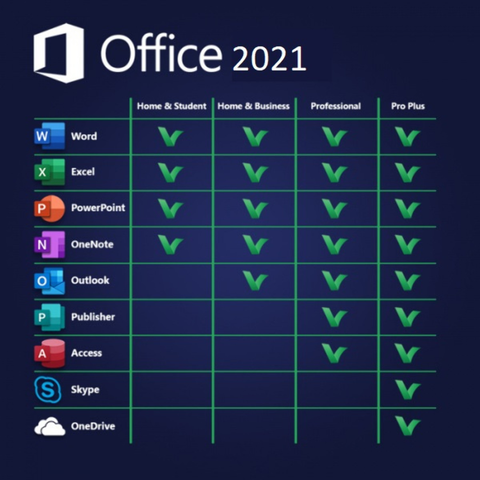
📦 Applications Included in the Suite:
-
Word 2021: Advanced document creation and professional editing.
-
Excel 2021: Powerful data analysis, new functions (XLOOKUP), and dynamic arrays.
-
PowerPoint 2021: Cinematic presentations with improved Morph and Zoom transitions.
-
Outlook 2021: Business-class email management and calendar synchronization.
-
Access & Publisher: Essential tools for database management and desktop publishing.
-
OneNote: Your digital notebook for seamless cross-device syncing.
Why Choose the Retail Version?
-
One-Time Payment: No monthly or yearly renewal fees.
-
Clean Installation: Using the official
.imglink ensures no third-party bloatware or modified files. -
Lifetime Validity: Once activated, the license remains valid for the lifetime of your device.
-
Global Language Support: Compatible with all official Microsoft language packs.

💻 System Requirements
| Component | Requirement |
| Operating System | Windows 10 or Windows 11 (Windows 7/8 not supported) |
| Processor | 1.6 GHz or faster, 2-core |
| Memory | 4 GB RAM (64-bit); 2 GB RAM (32-bit) |
| Hard Disk | 4.0 GB available disk space |
| Display | 1280 x 768 screen resolution |
Pro Tip: For a smooth installation, please ensure that any previous versions of Microsoft Office or Office 365 are fully uninstalled from your system before running the new setup.